The Documentation I Wish I Had
Solo Developing a Rust Microkernel OS, now on a Real RISC-V Board — Measured First, Written Against Tests.

In August, I ended with this sentence:
Then I want to get Open Nexus OS running on real RISC-V hardware, with real graphics hardware and real drivers.
That sentence was easy to write.
An operating system that only boots in an emulator is a promise. It becomes a serious project the day it runs on a board you can buy.
QEMU is a very polite machine
QEMU tells you exactly what it is.
Its devices are designed to be easy for operating systems. They are documented, predictable, and they forgive a lot. If something breaks, it is almost always your fault, and it fails the same way every time.
A real board doesn't do you that favour.
And here is the part I haven't said out loud before: I had never brought up a board. I can write a kernel. I had never made one talk to a display controller, a USB PHY or a GPU that nobody explained to me.
That bothered me for weeks.
And drivers are not a side topic for this project. They are the whole point.
Open Nexus OS exists because of the TV story: hardware changes faster than the software around it, and old drivers rot. I built the system so that writing a driver is small and fast — drivers outside the kernel, the common parts in a Driver Kit, only the hardware-specific bit left to write.
That is a claim. And this is exactly the place where I have to prove it.
Picking a board I could actually finish on
I chose the Banana Pi BPI-F3, built around the SpacemiT K1.
A SoC (system on a chip) is the one chip that holds the processor cores together with everything around them: memory controller, display, USB, GPU. For an OS developer, the SoC is the actual hardware; the board is mostly wiring.
My reasons were simple:
- Price and performance. Eight RISC-V cores for the price of a hobby board.
- Availability. I can actually buy it, and so can anyone who wants to follow along.
- A common SoC. The K1 sits on several boards, so work on one is not wasted on the next.
- Good developer tools. It flashes over USB, has a serial console, and ships with a Linux image I can log into and observe.
That last point turned out to matter more than all the others.
Very conveniently, I had just read about Alyssa Rosenzweig
Shortly before the board arrived, I had read an article about Alyssa Rosenzweig and her work on the GPU driver for Asahi Linux — a driver for hardware that came with no public documentation at all.
What stayed with me was not a specific trick. It was the attitude.
When there is no documentation, the hardware and the system that already runs on it are the documentation. You watch what the existing driver does. You write down what you see. Then you build against your notes, not against your assumptions.
My situation is far easier than hers. My vendor publishes a Linux image and driver sources I can read.
But I thought: maybe this isn't just a way to write one GPU driver. Maybe it is a way to bring up an entire board.
There was no first pixel. There was a blinking LED.
At the beginning, the board could not show me anything. No picture, and no serial cable attached either. The only thing my kernel could control that I could see was the little status LED on the board.
So the kernel learned to blink.
Every milestone of the boot became a pattern: one long pulse for every five, one short pulse for every one. Milestone 7 is long, short, short. A boot took about 22 seconds of me sitting in front of the board, counting.
For everything more than a few bits, I used a second trick. Our OS writes its log into a reserved area of the board's own storage. The loop looked like this: flash the OS onto the eMMC, pull out the microSD card, reset, let the board run for a minute, put the card back in, boot the vendor's Linux from it, and read what our OS had left behind.
The vendor system became my measuring instrument. It is how I read every result of our own system.
The LED found something no log could have shown: the kernel stopped silently at milestone 11, waiting for a timer that never came.
And once, when a reset was quick enough, the memory survived it. Our loader found the previous boot's console still in RAM and rescued it: the board's very first kernel output, with a few flipped characters like selft%st, because the memory was fading while it was being read. A lucky witness, never a proof. But I was very happy to see it.
From there, the outputs grew: the kernel's self-tests, four cores online, the first services, the first complete log on disk. Step by step, measuring and reading back, until it was time for a picture.
The first picture
Before writing any display code, I logged into the vendor's Linux and read the display controller's registers — once with the monitor running, once switched off, once unplugged. All of it went into a folder in the repository.
Then I wrote the driver, with one rule: every step prints a line, and every line can be checked.
The first board boot showed "no signal" on the monitor. But the boot log already said why: the controller's line counter was stuck at 0. Comparing my register writes with the vendor dump found a single word: I told the compositing stage to read from channel 3, while I fed the picture through channel 1. One fix, plus a test that rejects exactly that mistake.
The second boot showed our splash screen on a real monitor.
Two boots. It worked so well that it made me suspicious.
Then USB made me write it down
USB has many more moving parts: a controller, two PHYs (the chips that turn digital bits into the electrical signal on the wire), glue registers, and an on-board hub whose power is switched by GPIO lines. QEMU shows none of that. There, a virtual keyboard plugs straight into the controller.
This is where a gut feeling turned into a method. Six steps:
- Measure the vendor system first. Read-only, while the vendor's Linux is running: registers, clocks, resets, the device tree, which devices hang where. USB example: keyboard and mouse sit one hub deep, at full speed, and the mouse sends about 1,000 reports a second.
- Turn measurements into gates. A gate is a line my OS prints at boot, plus a check that decides pass or fail. A gate exists only because a measurement showed what it must catch. Example:
xhcid: controller ok (version=1.10 …)— the version the vendor dump showed. - Write tests from the gates. On my Linux machine, against a small model of the hardware that uses the measured values as expected results.
- Write the code against those tests.
- Run it on the board. One flash, one boot, one log, archived next to the measurement.
- Debug, then adjust the gate. Sharpen it to what the next failure would look like, or drop it if it measured the wrong thing. Never loosen it just to turn a red run green.
USB took twenty board cycles.
From cycle 4 to cycle 9, the controller's reset never finished. I compared register after register with the vendor dump, and every guess cost a full boot. By cycle 9 the lesson was obvious: guessing one register per boot is too slow. So I read the vendor's open-source drivers as a reference — register names and order only, nothing copied.
They had the answer. The SuperSpeed PHY shares a reset bit with another block, and that one bit has inverted polarity. "Set" means "held in reset", the opposite of every reset next to it. Our boot loader left it set. In cycle 10, keyboard and mouse worked.
Then the gate caught something I would have shrugged off: the mouse felt slow. With the vendor measurement in the repository, "slow" became a number: 325 reports a second instead of 1,000. By cycle 13 it ran at 1 kHz. Cycle 20 passed every check, with a person at the monitor confirming the desktop, the keyboard and the pointer.
Where to find it in the code
If you want to check any of this yourself:
- Measurements:
docs/board/measurements/, one folder per question, each README structured as Question → Instrument → Results → Verdict. The USB story is in2026-10-04-usb-topology/(the register scriptregdump.py) and2026-10-05-usb-cycle1/(every cycle with its gate table). - The early days:
2026-09-27-first-emmc-boot/(the read-back loop) and2026-09-28-dram-retention/(the LED and the rescued console); the blink code is insource/kernel/neuron/src/hal/boot_led.rs. - The driver:
source/drivers/usb/xhcid/, with the host model inmodel/and tests both intests/and next to the code — e.g.test_reject_a_pll_that_never_locks_and_a_block_that_does_not_read_backinsrc/ss_phy.rs. - The gates: declared in
source/apps/selftest-client/proof-manifest/markers/board.toml, judged on every board boot byscripts/board-test.sh. - The method itself:
.claude/skills/driver-bringup/, including the gate library and a list of traps, each with the date it was found.
The gates are the documentation
No datasheet told me that one reset bit is inverted.
Now there is a file in the repository that says so, a measurement that shows it, and a gate that fails if it ever comes back.
That is the documentation I wish I'd had when I started. It didn't exist, so the method writes it as a side effect. And unlike a PDF, it can be run again.
The bet: next time, only the deltas
This is the part I'm most curious about.
The measurement scripts are committed. When I bring up the next driver, or the same SoC on another board, I don't start from zero. I run the same scripts on that vendor system, compare the result with what is already in the repository, and only the differences need new work.
If that holds, every driver gets cheaper than the one before.
To be honest: that is a bet, not a result yet.
The GPU was its first real test, and I measured the stock graphics stack before writing a line of it. The vendor driver needs 640 µs of fixed cost per frame; an empty GPU job through ours currently makes the round trip in 131 µs. The vendor stack fills an opaque pixel in 1.8 ns; our compositor's opaque layer does it in 1.30 ns.
And the desktop now runs on the board's GPU, through our own driver: the compositor draws the whole frame there, frosted glass included, and only redraws what changed. To be clear about what that means: this is a GPU for everyday desktop use, not for 3D or gaming. There is still tuning left, and a few points are open on purpose. But it runs.
A method that suits agents
In my last post, I wrote that a large part of Open Nexus OS was built with AI coding agents. Bringing up a board has made me think more carefully about what makes this approach work.
The method doesn't take the thinking out of my hands. It depends on something neither measurements nor agents can provide on their own: a fundamental understanding of what the driver does, how the underlying hardware works, and what the driver will eventually need to support.
Because there is rarely just one way to make a driver work.
For example, a GPU driver that submits one job at a time to the hardware can work perfectly well. You get an image on the screen. But the system I want to build needs multiple GPU contexts, each with its own address space, so that a faulty client cannot bring down every other client by crashing the GPU.
Both implementations might pass an initial test. Only one fits the system's intended architecture. And that difference isn't a feature you can simply bolt on later. It shapes the entire design.
Leave that decision to an agent, and it will build what works today. Given the immediate task, there is little reason for it to do otherwise. But when a future use case demands capabilities the original architecture never accounted for, the cost goes far beyond rewriting the driver. Everything built on top of it may need to change as well.
That responsibility stays with me: understanding what the system is meant to become and designing the architecture accordingly.
What the method gives the agent is everything that follows from that decision: clearly defined constraints.
The agent doesn't invent register values; they come from the vendor system's register dumps. It doesn't decide when the implementation is good enough; explicit gates define the criteria. It doesn't have to reconstruct what happened last week; the measurement artifacts preserve that knowledge.
The workflow is deliberate: measure, define the gate, test, implement, validate on the board, and adjust the gate.
This has two effects.
First, the agent has far less room to hallucinate hardware behaviour. Its assumptions can be checked against measurements, and its implementation against explicit criteria.
Second, it uses far fewer tokens. Guesswork is expensive, for agents just as it is for people. Once the uncertainties have been reduced and the constraints are explicit, the remaining work becomes much more direct: inspect the measurements, implement against the tests, and verify the result against the gate.
This isn't automation. It's a division of labour.
I define what the driver needs to achieve and why. The measurements establish what the hardware actually does. The gates make success verifiable. The agent does the implementation work in between — and does it fast.
Where it stands
Open Nexus OS boots on the BPI-F3 from the board's own storage, shows the desktop on a real monitor, takes a real USB keyboard and mouse, and draws that desktop on the board's GPU with our own driver — for normal desktop use, not for 3D or gaming. Much of the board, like Wi-Fi, still waits for its first measurement.
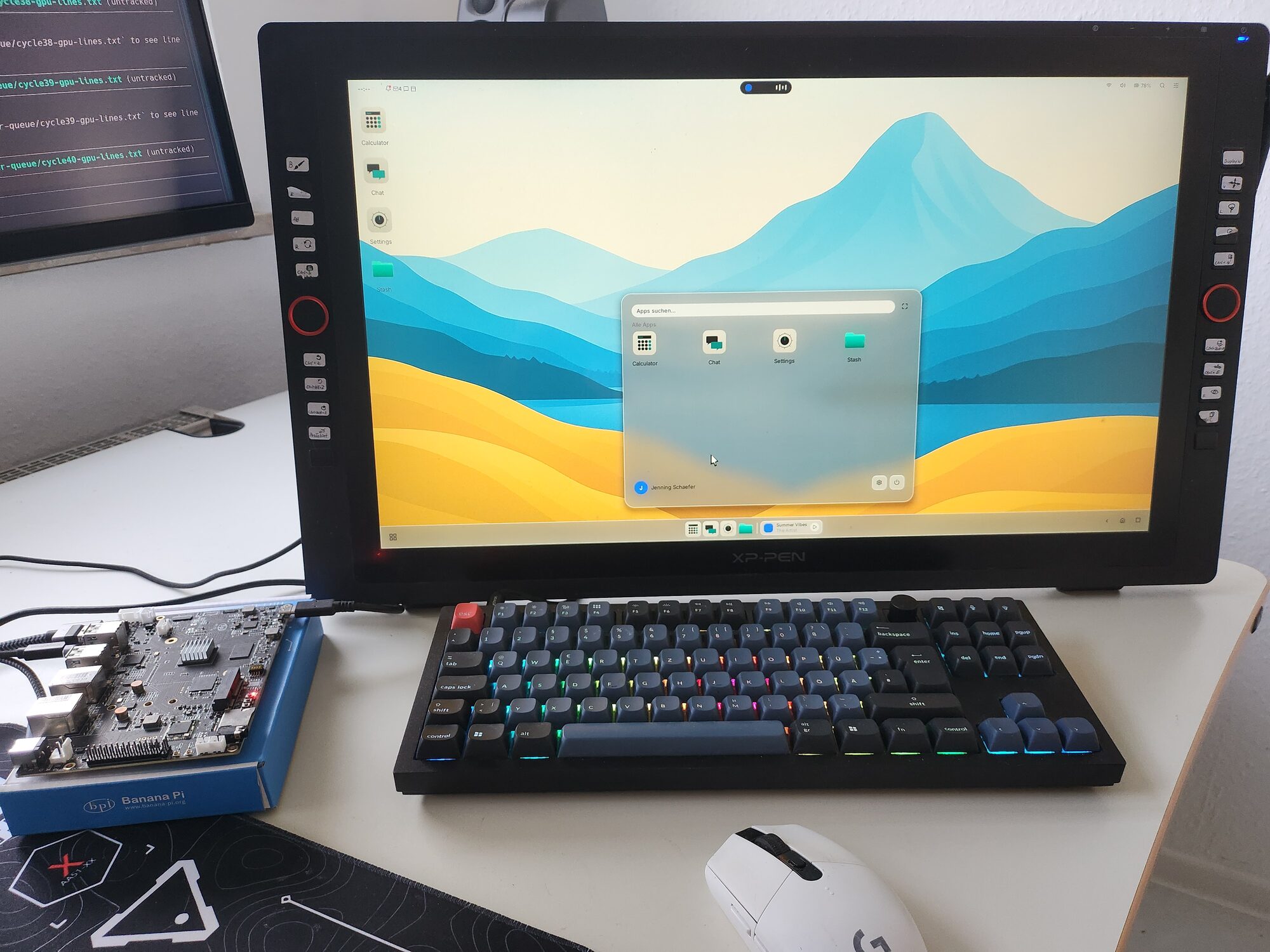
The BPI-F3 on the left, our desktop on the monitor, a USB keyboard and mouse in front. No emulator involved.
I'm still not an experienced hardware developer.
But I'm no longer guessing.